What's is Delphi DS150E VCI ?
Delphi DS150E shall develop and sell innovative, user friendly and reliable diagnostic solutions together with information, training and support to the global automotive aftermarket.
Delphi DS150E+ is owned by the Würth-group from Germany, with operations and retailers all over the world.
DS150E is a user friendly, fast and reliable Vehicles OBDII diagnostic tool.It will read/clean DTC ,make adjustments and activation, turn off the service light and more.
Not only older vehicles but also on new models with Delphi Diagnosis system, More than 48 brands Cars&Trucks will be full systems supported .
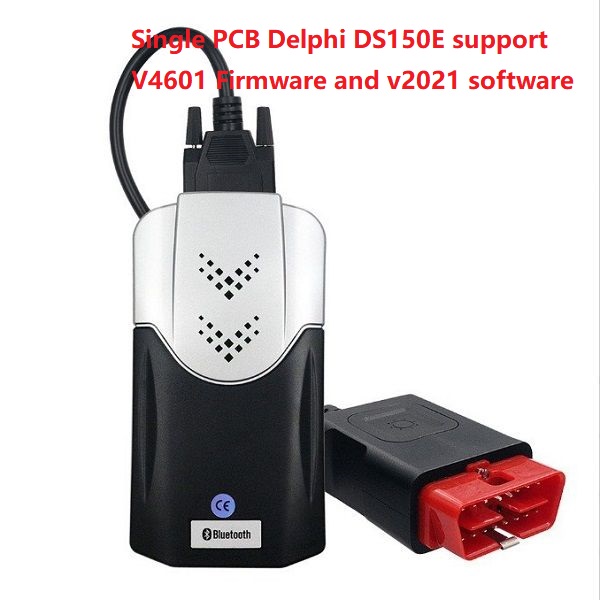
Original Classic Delphi DS150E+ cost about 1000EUR.Oh,too expensive that hardly to effort it ?No worry ,Buy this clone Delphi DS150E vci .
l Full chips come with Original Quality ,That almost 1:1 function
l Unlimited 2021/11 cars and trucks software ,supported upgrade to last V4601 firmware .
l Not only USB Cable connection but also build-in Bluetooth-module
l Free key-gen make to install on any Laptops,that easy to activate it anytime.
l Cheap dollars to get older cars/trucks OBD Cable
Main functions of Delphi DS150E 2021 ?
l Complete diagnose of all systems (ECU)
l Intelligent System Identification (ISI)
l Intelligent System Search (ISS)
l Intelligent System Update (ISU)
l Reading system information (VIN number, Part number, Software version etc.)
l Reading trouble codes (DTC)
l Clearing trouble codes (DTC)
l View current data in numerical and graphical form
l Flight Recording function of any parameters selected from any control unit with the ability to store and analyze them later
l Intelligent vehicle’s battery voltage control alerts with sound and visual signal
l Test/Activation of components
l Adaptation, coding, programming etc.
l Service remainder reset
l Other special functions
l Tips and DLC location overview
l Easy access to help and tips of diagnosis without leaving diagnostic program
l Save and print out test results (diagnostic data)
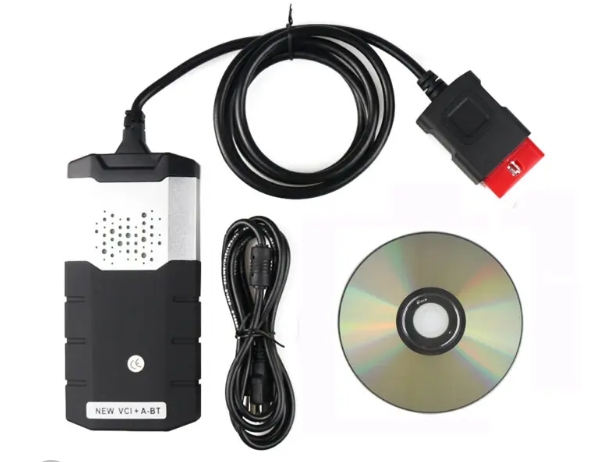
Whole Package List :
- Delphi VCI (SN 100251)
- USB CABLE
- V2021.11 Software CD with Keygen Unlimited install
Options Parts :Car cables set for older car included:
l BENZ-38 Pin Cable
l BMW-20P Cable
l PSA 30P Cable
l PSA-2P Cable
l Audi 2P+2P Cable
l OPEL-10P Cable
l FIAT-3P Cable
l Power Cable
Truck cables set for older truck included:
l SCANIA -16 Pin Cable
l 12 pin MAN Cable
l 37 pin MAN Cable
l IVECO-30P Cable
l BENZ-14P Cable
l Renault-12P Cable
l VOLVO-8P Cable
l 7 pin Knorr,Wabco Trailer Cable
How to Install Delphi Cars & Trucks Software ?
- Prepare one fresh Windows 10, 64bit or Win11. Do not install Antivirus Programme and disable Windows Defender first.
- Download the installation package from here
- Unzip first, then run the Delphi2021.EXE and follow the step by step. (installation password is ThankYou)
- It will ask select Firmware, If your’s Interface is single board, Choose V3201 Firmware. Otherwise better choose V1602.
- Since the Delphisoftware installed, open the Delphiicon on desktop. it will ask you activated. Just select the System ID and then CTRL+C, CTRL+V for copy the code
- Run the Keygen 2021, and paste code on the menu. Click Activate it will generate Your Delphi2021 activation keys
- Copy it to Your Auto com activate menu, and finish the activate. There will be no need activate Truck software any more. it is whole finished.
How to update to last V4601 Firmware ?
Important : Do no disconnect cable during the update process, otherwise you may firmware and Your Delphi may won’t work any.
l Download auto-com v4601 firmware here
l Connect Your auto com to vehicle and turn on engine for 12v power supply(make sure CDP VCI be found and turn on green led)
l Backup older firmware first (go to Program Files > Delphi> Firmware –backup)
l Copy 4601 firmware files to “Program Files > Delphi> Firmware Folder” after that to go Auto com CDP Software and click on Upgrade Firmware.
More about Ford VCM2 | VOLVO DICE
Media Contact
Company Name: OBD2-DIAG Technology Co., Ltd
Email: Send Email
City: Shenzhen
State: Guangdong
Country: China
Website: https://www.obd2-diag.com/